As most artists have recognized, new AI services for music production are popping up every week. But what tools should you use that actually give you the extra edge you need as a producer? We’ve created a list of 5 tools that surely will give you some extra firepower to create some great sounding songs. So let’s dive into it.
Masterchannel is a leading AI-powered mastering tool designed to make any artists feel comfortable that their song sound as professional as possible. With its intuitive interface, any artist can simply drag & drop their song in their service to get a full length free preview of their song and how it will sound when fully mastered. Due to this, Masterchannel is being used by tens of thousands of artists, ranging from beginners to Grammy Award winners – as they get the sound they really want.
AudioShake is an AI-driven composition tool that empowers musicians and composers to splits song recordings into instrument stems (vocals, drums, guitar, bass, wind, piano, and other) and instrumentals, to be used for a wide-range of uses cases, from sync licensing and mixing, through to interactive audio and content analysis.
With VoiceSwap, users can seamlessly alter vocal performances, adjust pitch and timing, and change the timbre and style of a singer’s voice—all with the click of a button. Whether you’re remixing a track, creating vocal harmonies, or experimenting with vocal effects, VoiceSwap offers flexibility and control, allowing you to transform ordinary vocals into great performances.
Soundful allow you to leverage the power of AI to generate Royalty Free Background Music to use in your music production. With Soundful you can also create small loops to use in your production, to both help you with the creative process, and to extend your productions with samples that you can’t create yourself.
TwoShot is an AI-powered platform that allows artists to create music creation workflows by generating and manipulating samples using AI models from TwoShot’s model marketplace. In this marketplace you can find models like “Guitar Sample Generator” which allows you to generate guitar samples to use in your music. You can also find drum generators which allow you to create drum loops and drum fills to use in your productions.
When you are set to release your spatial audio track, it’s important to know where and how you best do it. This article will explain how and where you can distribute your Spatial AudioTracks after you mastered it with Masterchannel SpatialAI!
Before you distribute your spatial audio tracks make sure the file is technical valid and is in ‘AMD BWF‘ file format.
When you are uploading a song to a distributor you’ll need two files:
1 Stereo master file
1 ADM BWF file
Apple Music (and other streaming services supporting Spatial Audio) cross checks these two files to see if they have identical length and the same content, so make sure you upload both of these.
If you have used SpatialAI by Masterchannel to master your Spatial file then you have received these two files in the right format through a zipped file, so you are ready to find the right distribution platform for your music.
Where can I distribute my Masterchannel Spatial track? There are several platforms that accepts distribution of spatial audio files. The following list highlights some common distribution platforms that distribute spatial audio files:
Are you a distributor want on this list? Reach out via email down below to be added
How will I know if my release was successful? After you have distributed your song through a distribution platform, you need to wait around 4 weeks before your spatial audio track is live.
The easiest way to check if it is live, is to go to Apple Music or Itunes and search for your song. Look for the ‘Dolby Atmos’ badge below the release. If this is showing then you have successfully released a spatial audio track.
More Information If you have any questions about SpatialAI by Masterchannel or inquires regarding how we can help you transition to spatial audio, feel free to check out our web page https://masterchannel.ai or reach out to us at support@masterchannel.ai.
AI in music production is taking off, and there is one particular part of the production process where AI now can give you the edge you need as a producer: Mastering of your music.
Mastering is the final step in the production chain, where an engineer (or an AI) make sure that the song is balanced and optimized to be played back on a variety of speakers and devices. Typical tools used in this process are Equalization, Dynamics & Saturation and Stereo Imaging.
Here’s 5 AI mastering tools you should know about:
Masterchannel is a Norwegian service, co-founded by DJ and producer Matoma and audio engineer Simon Hestermann, and has been praised for its audio quality, which is similar to that of a human mastering engineer. The quality is provided due to the use of reinforcement learning, which mimics how a mastering engineer is working, in order to provide a service that is both agnostic to mood and genres.
Pros
Professional audio quality, similar to a human engineer; best mastering results on the list.
Unlimited downloads of mastered songs for only $25 / month or $15 / month (when yearly).
User-friendly and easy to understand what has been done.
Landr is a Canadian company that started out with AI mastering in 2014 and is the oldest company within this domain. Since its inception, the company has developed several new creator tools tailored towards artists.
Pros
Several creator tools that can help you in different aspects of your career.
Good price when going for the full suite and not only mastering.
Cons
Audio known to sound artificial compared to other services.
Expensive – mastering costs $39 / month.
For the more affordable subscriptions, number of WAV masters is limited.
eMastered is a company that both develops their mastering AI in addition to being the company behind the ATOM Synth. The company was one of the first mastering services out there.
Mixea is a mastering service created by the distribution company Distrokid, and is the newest one to be added to the list. Distrokid is a New York based company that has been operating since 2013.
Pros
Unlimited number of mastered songs.
Cheap solution if you have a frequent output.
Cons
Less flexible pricing, as you need to pay for a full year.
Audio known to sound artificial compared to other services.
Bandlab is a Singapore based company creating several tools to use when making music. The company started as a social network and has gone on to explore several parts of the industry.
Pros
You don’t need an account to master your songs
A free service that can be good for beginners.
Cons
The audio quality is very limited compared to other services
The presets does not tackle on of the main problems with mastering, which is dynamic sound across devices.
Conclusion
While each of these services are good in their respective way, Masterchannel.ai is easily the best service on this list for music mastering. Whilst other services can be cheaper if you commit to a yearly subscription (some are even free): If you care about the end result of your tracks, choose Masterchannel.
Music production is a field where you always have to adapt to a quickly changing environment. Whether you’re a beginner or an advanced producer. These 10 tips will help you to improve your music production skills!
1. Don’t overcrowd your room
Be sure not to fill the space with unimportant elements that do not contribute to the context or character of the song. Be clear about which 3-4 tracks you really need for the song.
If you have vocals, they are usually the most important part of the song. Therefore, all elements should support the vocals. Remember though: these are rules and rules are there to be broken.
Do your songs sometimes feel empty? Try using vocal adlibs or chops to fill the space and put your vocals in a new light. Adlibs can really bring seasoning to a song. Remember: Too many ad libs can oversaturate the song!
Adlibs are an improvisatory vocal recording technique and refer to signature impulsive vocal effects. A good example is “Mood (feat. iann dior)” by 24kGoldn. Notice how subtle adlibs add to the overall energy towards the end of the track.
Adlibs should sound different from the main lead vocal. Make sure to process them differently and on a separate channel.
3. Repurpose elements
You can try to creatively repurpose elements that you already have. It may be a synth arp, a vocal melody phrase or a bass sound. Get creative with those elements to create sounds that are coherent with your already existing production.
Try resampling a certain part, reverse it, cut up the sample, pitch it, throw an effect on the channel and see what you get.
4. Layers and layers of the good stuff
Lacking depth and thickness in your tracks? Then try layering!
Pick one instrument (i.e. Juno synth)
Pick a complementing instrument or sound (i.e. Serum soft pad)
Send all instruments to one bus
Try applying slight compression to the bus. Notice how the compressor glues the different elements together.
Bus compression adds a sense of “glue and punch” to the mix and creates a cohesive feel between the different tracks.
5. Use references
Ever used reference tracks? If not, you should definitely give this a try. Listen to a specific element in a song you like. Compare that element to your own song and then try to improve your element.
Here is a list of examples you can reference when listening to a song:
The sound of the snare
Vocal production
Arrangement
Percussion fills
Mix
You should not reference more than two elements from the same song, otherwise you might end up copying the whole song.
6. Contrast and color your arrangements
Music lives on contrasts. Loud and soft, foreground and background, left and right, small space and big space. Create tension by changing the instrumentation in the different sections of your song. A good way to create contrast in your arrangements is to take away sounds.
Want to turn down the energy? Try removing drums and bass as a start!
Listen to “New Rules” by Dua Lipa and notice how the instrumentation changes in each section.
7. Automation as a creative tool
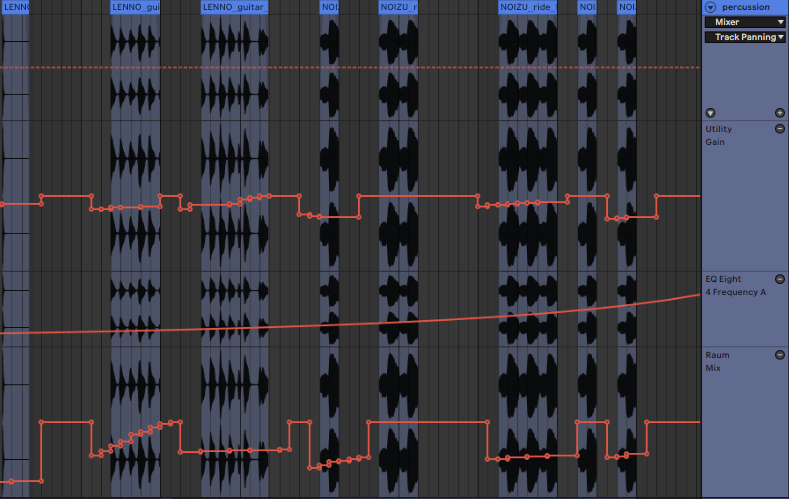
Automations are often what differentiate a beginner production from a professional music production. You can create a lot of interest with minimal sounds by using automations! Your songs will sound more dynamic and keep the listeners engaged.
Common elements to automate:
Gain/volume
High pass / low pass
Pan (left/right)
Dry/Wet of Delay or Reverb
Automation lines in Ableton Live 11. Utiliy Gain, Low pass filter and Dry/Wet signal of the Raum Reverb automated.
Automations can help to introduce new elements more softly or to move them into the background.
8. Collaboration
Are you collaborating frequently? If not, then this might help you a lot! When collaborating you can learn a lot about how other people work and learn their tips and tricks. Also you can expand your network within the music industry which may be beneficial for your career.
You can collaborate on various fields:
Co-producing a song together
Writing session with a topliner
Finish a song someone else started
Produce a topline from someone on TikTok
How to find collaborators you ask? You can reach out to artists or producers you like very easily these days. Here are a few platforms, you can check out to find like-minded people:
Facebook (music production groups for example)
Instagram (reels)
Discord (Producer discord servers: Kenny Beats, Ian Kirkpatrick, KREAM, …)
TikTok
Reddit
Remix Competitions
9. Check your mix in mono
As many people today listen on portable sound systems or even their phones it is important to check your mix in mono. While producing simply turn the signal into mono and route it to the left or right channel.
Also make sure to check your mix on different sound systems while producing so you understand how your music sounds outside of your known sound environment. Systems and places to check are:
Airpods / Airpods Pro
Over-ear headphones
Laptop speakers
Car
Portable speaker (JBL, Bose, Sonos, etc.)
Remember: Bass frequencies are not linear, when you turn the volume up and down. Make sure to listen to your track very quietly and see if it still has the energy you are looking for
10. Don’t overheat your bounce
Make sure to bounce your mix correctly before mastering it! Check out these 3 simple steps by Matoma to prepare your mix for mastering.
When you are happy with your mix you can upload it to Masterchannel for mastering. Get your first mastering session for free when you sign up for an account.