Author: christian@masterchannel.ai

  • Mastering Organic & Acoustic Music

    Mastering Organic & Acoustic Music

    In a world dominated by the “loudness war,” there is a growing movement back toward the quiet, the raw, and the real. Whether you’re crafting a delicate Folk ballad, an Indie-Acoustic anthem, or a complex Jazz arrangement, your goal isn’t to compete with a heavy metal wall of sound, it’s to make the listener feel like they’re sitting in the room with you.

    Mastering this type of music requires something rare in the digital age: restraint. Here is how to give your acoustic tracks a professional finish while keeping their soul intact.

    In organic music, volume is a storytelling tool. If you compress a track until it’s a flat line, you lose the emotional impact of a singer’s whisper or the swell of a cello.

    The “quiet” parts of your song should feel intimate and breathy, making the “loud” moments feel earned and powerful. A great master preserves this dynamic range, ensuring the song “breathes” naturally rather than sounding like it’s being squeezed through a straw.

    Nothing kills a campfire vibe faster than too much digital processing. Over-sharpening the high end or applying aggressive limiting can make acoustic guitars sound brittle and “plasticky.”

    To maintain an organic vibe, the mastering process should be almost invisible. The goal is to enhance what is already there—the warmth of the wood, the grit of the vocal, and the resonance of the room, rather than covering it in a layer of synthetic gloss.

    It sounds like a paradox, but AI can actually be the best tool for preserving “human” imperfections. Masterchannel’s AI aren’t just programmed for volume; they are trained on world-class engineering principles that prioritize musicality.

    When you select an organic profile, our AI understands the assignment:

    • It avoids the “brickwall” look.
    • It prioritizes harmonic warmth over raw decibels.
    • It ensures your track sounds “finished” and professional without ever feeling “processed.”

  • Music Production Tips: Understanding the Different EQ Curves

    EQ (Equalization) is one of the most powerful tools in your mixing arsenal. By understanding the different types of EQ curves, you can surgically remove problems or add musical character to any track.

    • Purpose: To cut unwanted low frequencies.
    • The Use Case: Use this on almost everything except your kick and bass to remove low-end rumble and make your mix sound tighter.

    • Purpose: To cut unwanted resonances.
    • The Use Case: If you hear a sharp, “whistling” frequency or an annoying ringing in a snare drum, use a narrow notch to surgically remove just that frequency without affecting the rest of the sound.

    • Purpose: Bringing the sound more to the back.
    • The Use Case: By cutting high frequencies, you can make an instrument sound further away or “darker,” which helps lead elements (like vocals) stand out in the front.

    • Purpose: To boost or cut high frequencies.
    • The Use Case: A gentle boost with a high shelf can add “air” and expensive-sounding clarity to a vocal or acoustic guitar.

    • Purpose: To emphasize certain frequencies.
    • The Use Case: Unlike the narrow notch, a wide bell is used for broad, musical changes—like adding a bit of “warmth” to the mids or “presence” to a lead synth.

    • Purpose: To boost or cut low frequencies.
    • The Use Case: Use this to add a consistent “body” to a thin bassline or to reduce the overall “thickness” of a track without completely removing the low end.


    A common rule of thumb is to use Narrow Bell Notches for cutting out bad sounds and Wide Bells or Shelves for boosting the good ones. This keeps your EQ changes sounding natural and musical.

  • Music Production Tips: Understanding Attack, Decay, Sustain and Release

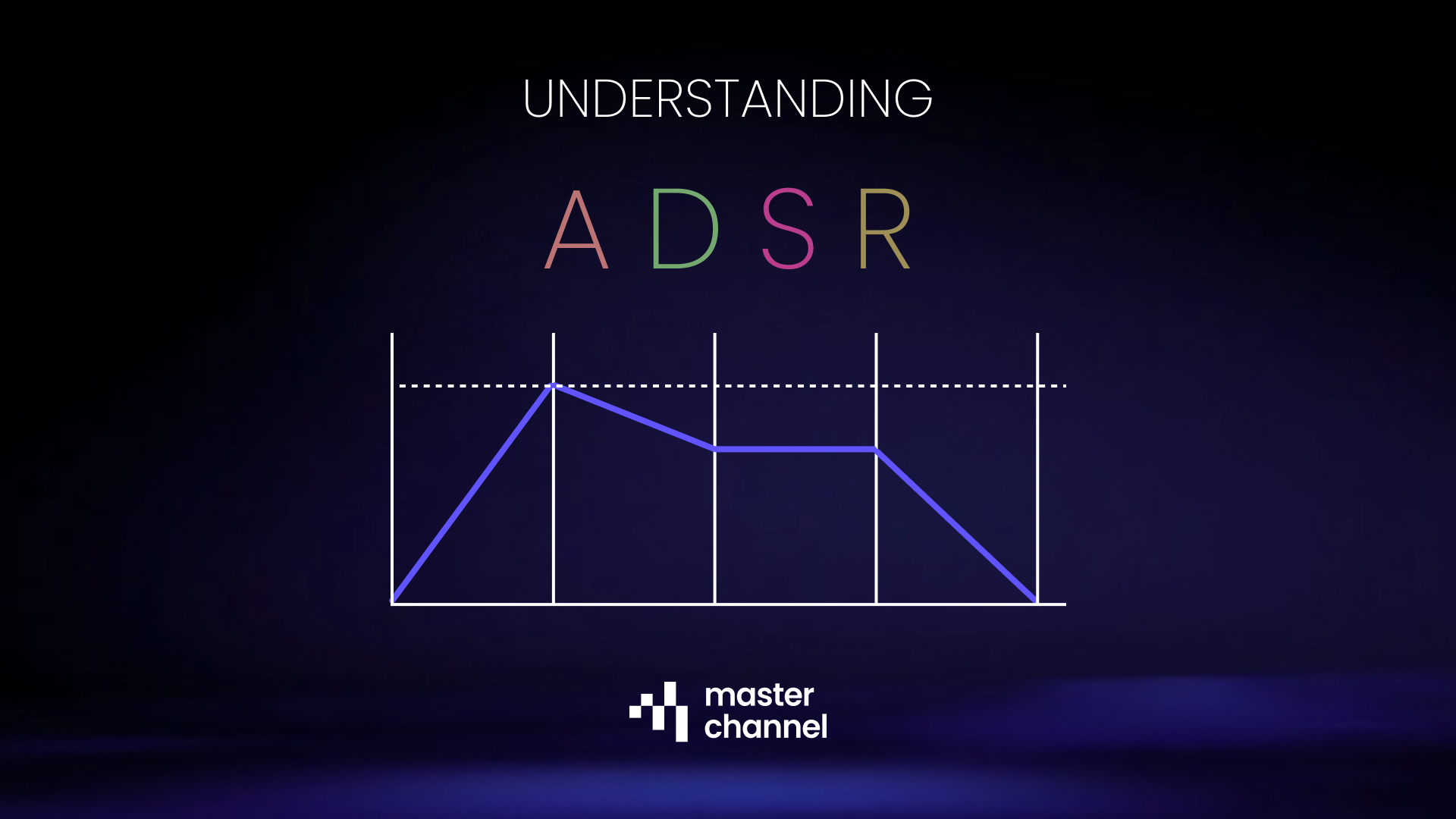
    If you’ve ever wondered why a piano note fades away slowly while a drum hit stops instantly, the answer lies in the A-D-S-R Envelope. Understanding these four phases allows you to transform a static beep into a lush pad, a sharp lead, or a punchy bass.

    • The Definition: The time it takes for the sound to go from silence to its peak volume after a key is pressed.
    • The Vibe: A fast attack creates a sharp “pluck” or “hit” (perfect for drums). A slow attack creates a “swell” effect (perfect for ambient pads or strings).

    • The Definition: The time it takes for the sound to drop from its highest initial peak down to the sustain level.
    • The Vibe: Short decay times create snappy, percussive sounds. Longer decay times allow the initial impact to linger before settling into the body of the note.

    • The Definition: Unlike the other stages, this isn’t a measure of time; it is the volume level at which the sound maintains as long as the key is held down.
    • The Vibe: High sustain keeps a sound full and loud (like an organ). Low sustain makes the sound feel more “staccato” or brief, even if you keep your finger on the key.

    • The Definition: The time it takes for the sound to return to silence after the key is released.
    • The Vibe: A fast release cuts the sound off instantly, which is great for tight rhythmic parts. A long release creates a “tail” or “echo” effect, making the sound feel like it’s in a large room.


    Mastering ADSR is the key to cleaning up your mix.

    • Too much release on a bass synth can cause notes to overlap and create “mud.”
    • Too slow of an attack on a lead vocal or synth can make the track feel like it’s dragging behind the beat.

    By visualizing the curve of your sound, you can ensure every instrument has its own space in the timeline of your song.

  • Music Production Tips: Using the Camelot Wheel

    Have you ever wondered why some song transitions sound like a single, continuous masterpiece while others feel like a train wreck? The secret is Harmonic Mixing. By using the Camelot Wheel, you can ensure that the keys of two tracks complement each other perfectly.

    The wheel is divided into two rings that help you identify the “flavor” of the key:

    • The Inner Ring (A): Represents Minor keys. These often sound more emotional, dark, or moody.
    • The Outer Ring (B): Represents Major keys. These generally feel happy, bright, and energetic.

    The genius of the wheel is that it visualizes mathematical relationships between musical notes.

    • Neighboring Numbers: The most compatible keys are right next to each other. For example, if you are playing a track in 8A, you can safely move to 7A or 9A.
    • Bigger Gaps = Higher Risk: As the image notes, the bigger the difference between numbers, the less likely the tracks are to match harmonically. Moving from 1A to 7A will likely result in a “clash” where the melodies fight each other.

    You aren’t stuck in one ring! You can move vertically between the “A” and “B” rings as long as the number stays the same.

    • The Switch: Transitioning from 8A to 8B is a great way to change the energy of a set, going from a moody minor vibe to a bright major uplift, without losing harmonic consistency.

  • Music Production Tips: Hotspots for Your Kick

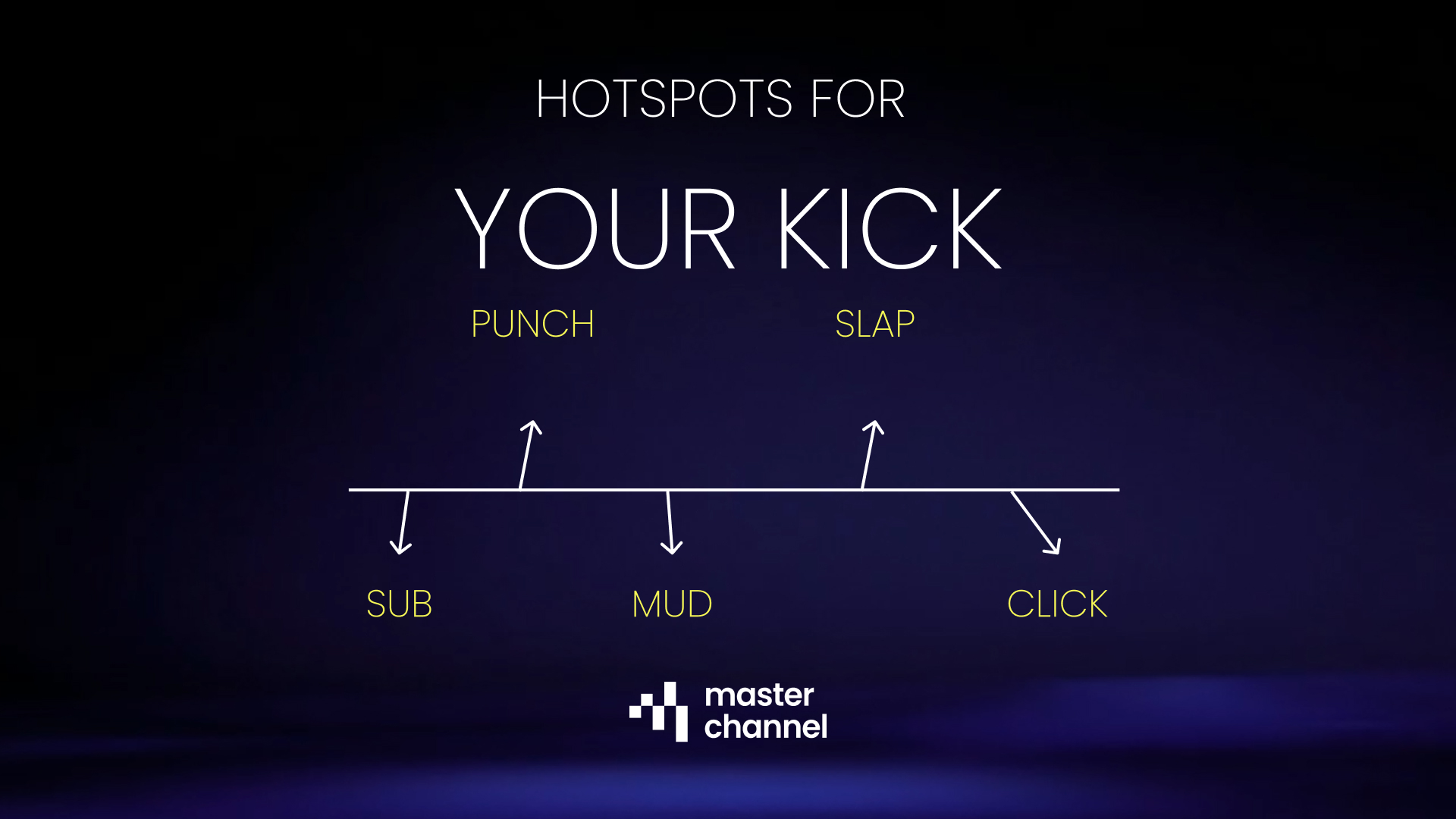
    When you’re EQing a kick drum, you aren’t just adjusting volume; you’re adjusting the feel of the track. By focusing on these five specific zones, you can move from a flabby, weak sound to a tight, driving rhythm.

    This is the area you feel in your chest.

    • The Goal: Provide that deep, sub-frequency weight.
    • The Warning: Too much energy here will eat up your “headroom,” making it impossible to get a loud master later on.

    This is the “meat” of the kick.

    • The Goal: To give the drum its physical “thump” that carries through smaller speakers.
    • The Fix: If your kick feels thin or lacks energy, try a small boost in this range.

    This is the most common problem area for kick drums.

    • The Goal: To remove the “boxy” or “cardboard” sound.
    • The Fix: Most producers use a surgical “dip” (cut) in this range to clean up the sound and make room for the bass guitar or low-mids of other instruments.

    Want your kick to be heard on a laptop or phone speaker? This is where it happens.

    • The Goal: To highlight the sound of the beater hitting the drum skin.
    • The Fix: A boost here adds “slap” and definition, helping the drum cut through a dense wall of guitars or synths.

    This is the high-frequency “snap”.

    • The Goal: To add extreme clarity and modern “pop” to the attack.
    • The Fix: Use this sparingly for metal or electronic tracks where you need the kick to have a very sharp, surgical top-end.


    A great kick mix is often about balance: boosting the Punch for power, cutting the Mud for clarity, and adding a touch of Slap for definition.

  • Music Production Tips: Treat Compressors Like Your Mother

    If EQ is about carving out space, compression is about control. It’s the tool that glues a mix together, making sure the quiet parts are audible and the loud parts don’t jump out and scare the listener.

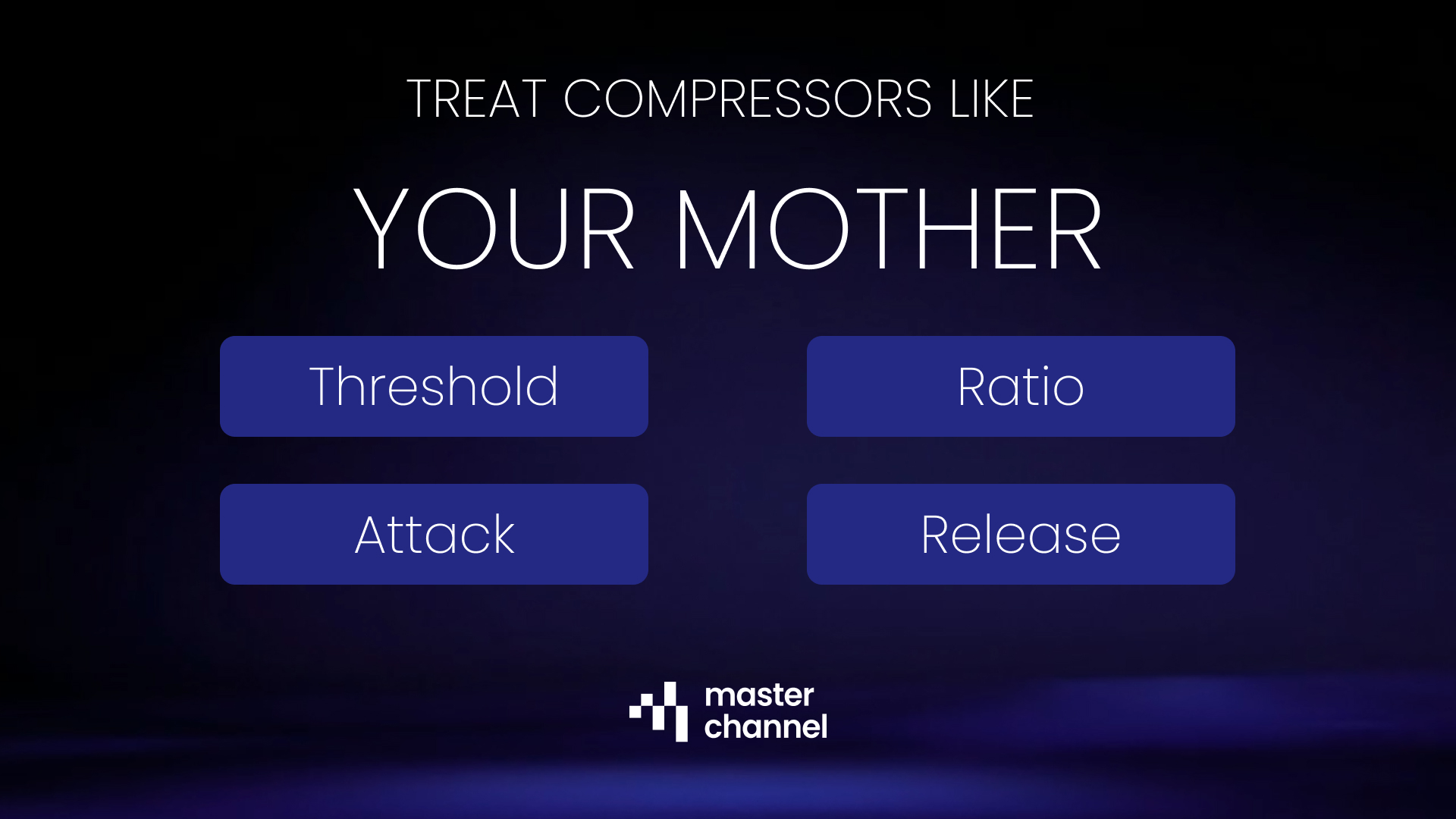
    But with all those knobs, Threshold, Ratio, Attack, Release, it’s easy to get overwhelmed. To make it simple, let’s compare a compressor with a relatable household scenario: Your Mother.

    • Threshold: The “Boundary” Line
      • The Analogy: This is the specific volume level she asks you to turn the music down to.
      • The Technical: The compressor does nothing until the audio signal crosses this level. Once the volume hits the threshold, the “policing” begins.

    • Ratio: The “Strictness” Factor
      • The Analogy: This is how much you actually turn the volume down after she shouts at you.
      • The Technical: Ratio determines the intensity of the volume reduction. A low ratio (2:1) is a gentle nudge; a high ratio (10:1 or higher) is like a brick wall that won’t let the volume go any further.

    • Attack: The “Reaction Time”
      • The Analogy: How fast you react after she shouts at you.
      • The Technical: This controls how quickly the compressor starts squashing the sound once it crosses the threshold. A fast attack kills the “punch” (transients), while a slow attack lets the initial hit through before clamping down.

    • Release: The “Recovery” Speed
      • The Analogy: How fast you turn the volume back up after she closes the door.
      • The Technical: This determines how long it takes for the compressor to stop working and let the volume return to normal. If it’s too fast, the audio might “pump” unnaturally; if it’s too slow, it might squash the next beat before it even happens.

    Without compression, your mix will feel “jumpy.” A vocal might be perfect in the verse but get buried in the chorus. By using these four controls, you ensure your track stays consistent, professional, and balanced, just like a well-behaved household.

  • Music Production Tips: Detect Clashing Frequency Ranges

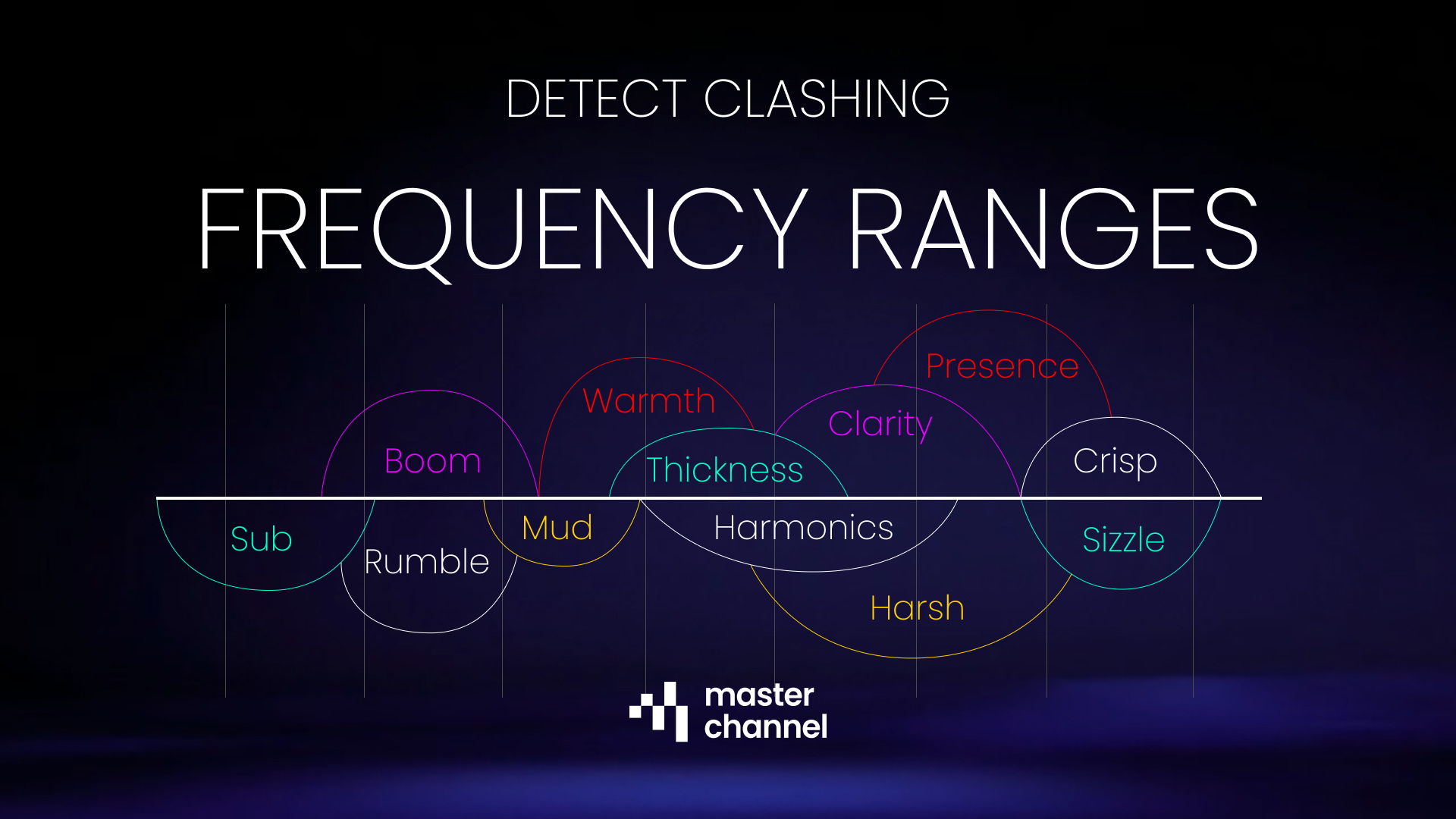
    Have you ever finished a mix only to find it sounds “blurry”? You can hear the kick drum, but it feels soft; the vocals are there, but they lack sparkle. This is often caused by frequency clashing, when two or more instruments compete for the same real estate in the audio spectrum.

    To improve the sound, you need to treat your frequency range like a house: if you put too much furniture in one room, no one can move.

    Here is how to use the frequency map to declutter your mix.

    This is the “physical” part of the music. If you have a synth bass and a kick drum both sitting heavily in the Sub area, they will clash, creating a weak, flubby low end.

    • The Fix: Use a high-pass filter on everything that isn’t a kick or a primary bass. You don’t need 50Hz energy in your vocals or guitars.

    This is where most amateur mixes fail. Too much Boom makes a track feel heavy and slow, while too much Mud (250Hz–500Hz) makes it sound like it’s being played through a cardboard box.

    • The Fix: Be aggressive with EQ cuts in the “Mud” range for instruments that provide “Warmth” (like acoustic guitars or pianos) to let the snare and vocals breathe.

    This is the “meat” of the instrument. It’s where we find the Thickness of a snare or the Harmonics of a vocal. However, if this area is over-packed, the mix becomes Harsh and fatiguing to the ears.

    • The Fix: If the mix sounds “honky” or annoying, look for a buildup around 1kHz–2kHz. Slight cuts here can smooth out a digital-sounding track.

    This is where the “expensive” sound lives. Presence (3kHz–5kHz) helps a vocal sit on top of the mix, while Sizzle and Crisp highs (8kHz+) add air and excitement.

    • The Fix: Be careful! Too much “Sizzle” leads to sibilance (harsh ‘S’ sounds). Use a de-esser to keep the highs crisp without piercing the listener’s eardrums.


    If you can’t tell which two instruments are clashing, try the Mute Test. Mute one instrument; if the other instrument suddenly sounds clearer and more defined, you’ve found your clash. Use the frequency ranges above to carve out space so both can coexist.

  • This Is How to Use the New Masterchannel Component!

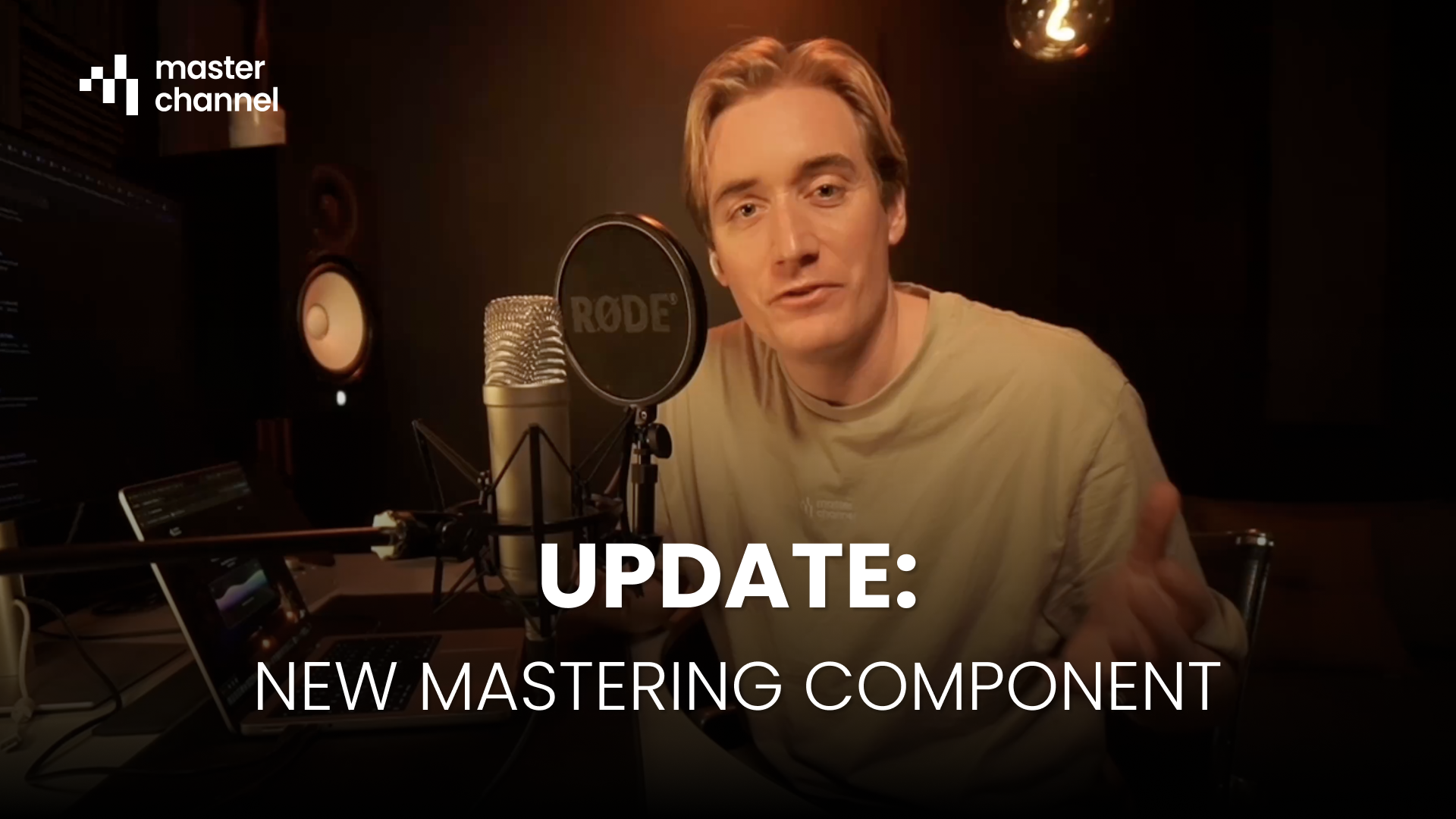
    We at Masterchannel recently released our new Mastering Component, and so far, people are loving it!

    Compared to the previous version, we’ve upgraded the new service with some key features, essential for anyone creating and producing music.

    With the new component you can now:

    • See what audio resolution you uploaded, and what you get back. For more information, see our blog post on audio resolutions here.
    • Turn on/off Normalization, meaning you’ll get a more “Real” listening experience.
    • Jump back and fort more easily with the navigation buttons, AND loop the song so you can listen to the fine details in your track.
    • Analyze you track, based on LUFS-levels, Peak dBFS and EQ Balance.

    We hope you’ll like the new update. To test it on your own music, click the button down below:

  • Use this tool with FL Studio Web (Browser version)

    FL Studio has officially launched its Web public beta, bringing its pattern-based workflow directly into your browser! This is a massive shift, offering instant access and seamless compatibility to start and finish tracks anywhere, on any computer.

    While FL Studio Web is perfect for production, every track needs mastering, the final, critical step for ensuring your music sounds loud, clear, and ready for streaming.

    This is where you need a specialized tool to finish strong.

    The most efficient modern workflow for producers on the go is to combine the flexibility of FL Studio Web with the professional polish of Masterchannel.

    1. Produce in FL Studio Web: Create and mix your track in the browser-based DAW.

    1. Export and Upload: Export your mix from FL Studio.

    1. Upload to Masterchannel: The AI mastering engine instantly analyzes your track, delivering a professional and ready master optimized for all streaming platforms.

    This combination gives you the world-class creative tools of FL Studio and a consistently high-quality final master, all without the need for complex engineering knowledge.

    Learn more by clicking the button below

  • Two Years, 200,000 Masters: Celebrating the Success of Wez Clarke AI

    Two years ago, the music world shifted. We at Masterchannel launched Wez Clarke AI, the world’s first AI clone of a GRAMMY-winning engineer, and today we are thrilled to celebrate this groundbreaking service’s second anniversary!

    When we pioneered this collaboration with the legendary Wez Clarke, our goal was to democratize his signature “chart-breaking touch. For those who don’t know the legacy of Wez Clarke, he’s done a lot:

    • 1 Grammy Award and 2 Grammy Nominations.
    • 13 UK Number 1 hits.
    • 27 billion streams.
    • Engineered songs for artists like Avicii, Sam Smith, Clean Bandit, MK, Becky Hill and many more.

    Now, two years on, the results speak for themselves.

    Wez Clarke AI was designed to infuse every track with the clarity, depth, and competitive edge that defines Wez’s sound, ensuring masters are perfectly Streaming Optimized and sound incredible on every Speaker System. This commitment to world-class quality has fueled phenomenal growth.

    We are incredibly proud to announce that, in just two years, close to 200,000 songs have been mastered and optimized using Wez Clarke AI.

    What’s even more staggering is the recent acceleration of this success: a massive 10% of that total volume came in November alone! This incredible surge is a testament to how producers and artists around the globe are embracing AI not as a replacement, but as a powerful, professional tool to meet the highest engineering standards.

    As Wez Clarke himself puts it:

    “AI is transforming music production, and with this collaboration I am ensuring it is up to my high engineering standards.”

    Thank you to every producer who has trusted Wez Clarke AI with their music. Here’s to transforming the next 200,000 tracks and many more years of industry-leading AI mastering!


    Ready to give your music the competitive edge of a GRAMMY-winning engineer? Try Wez Clarke AI for free today.

Exit mobile version